
sjq is a command-line JSON processor that reads the jq language. The filters you write for jq work with sjq, and on large inputs they run ten to almost two hundred times faster.
sjq '.statuses[] | {id, name: .user.name}' twitter.json
sjq -c 'select(.status == 404) | {ip, url}' access.ndjson
sjq -r '.[] | "\(.id)\t\(.name)"' users.json
Install
Linux and macOS:
curl -fsSL https://raw.githubusercontent.com/simdjson/sjq/main/install.sh | shWindows (PowerShell):
irm https://raw.githubusercontent.com/simdjson/sjq/main/install.ps1 | iexWith Homebrew (macOS, Linux) or Scoop (Windows):
brew install simdjson/tap/sjq
scoop bucket add sjq https://github.com/simdjson/sjq
scoop install sjq/sjq
The scripts download the binary for your system from the latest release and check its SHA-256 checksum. The Linux binaries are static (x86-64 and ARM64), the macOS binary runs on Apple silicon and Intel Macs, and Windows has x64 and ARM64 builds. One binary is enough for each system: simdjson detects the processor when sjq starts and picks the fastest code it supports.
Performance
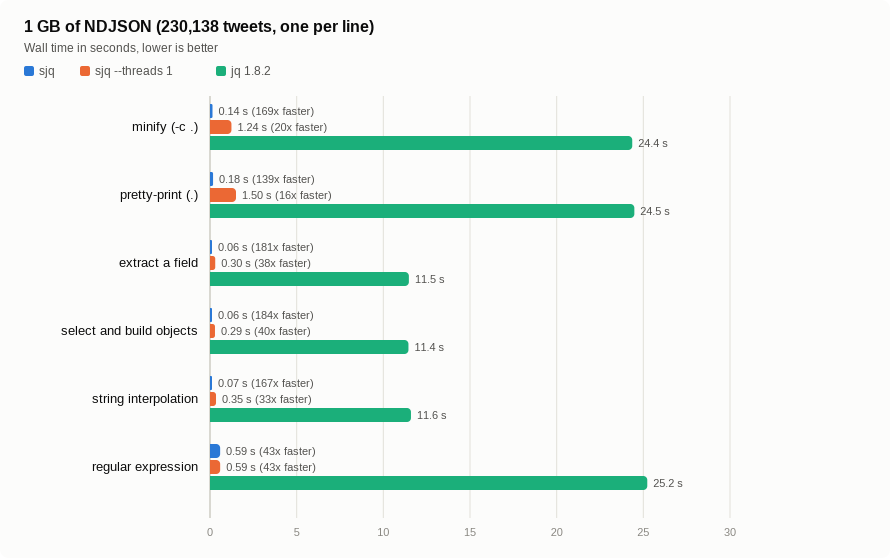
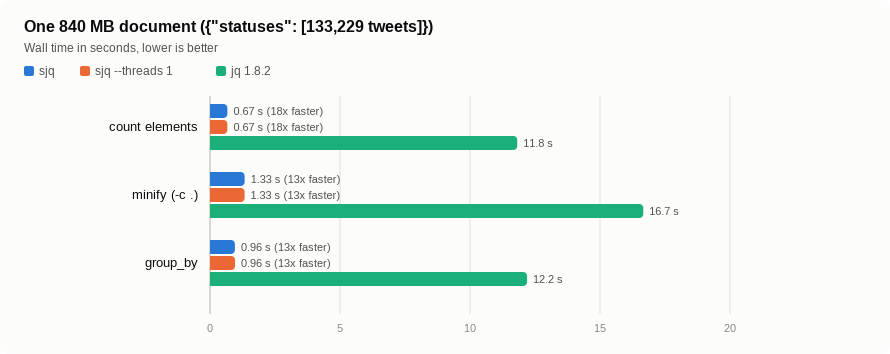
We compared sjq with jq 1.8.2 on two inputs built from simdjson’s
twitter.json sample: 1 GB of newline-delimited JSON (one tweet per line) and
one 840 MB document. The outputs of jq and sjq are identical. “sjq” is the
default, which filters large newline-delimited files on all cores;
“sjq –threads 1” uses one core.
| Input | Workload | jq 1.8.2 | sjq, one thread | sjq |
|---|---|---|---|---|
| 1 GB NDJSON | minify (-c .) |
24.4 s | 1.24 s | 0.14 s |
| 1 GB NDJSON | pretty-print (.) |
24.5 s | 1.50 s | 0.18 s |
| 1 GB NDJSON | extract a field | 11.5 s | 0.30 s | 0.06 s |
| 1 GB NDJSON | select and build objects | 11.4 s | 0.29 s | 0.06 s |
| 1 GB NDJSON | string interpolation | 11.6 s | 0.35 s | 0.07 s |
| 1 GB NDJSON | regular expression | 25.2 s | 0.59 s | 0.59 s |
| 840 MB document | count elements | 11.8 s | 0.67 s | 0.67 s |
| 840 MB document | minify (-c .) |
16.7 s | 1.33 s | 1.33 s |
| 840 MB document | group_by |
12.2 s | 0.96 s | 0.96 s |
Mean wall time with sjq 0.3.0 on a dual Intel Xeon Gold 6548N server (Linux, GCC 16), with jq’s official static binary and hyperfine. Every run on one thread is pinned to the same socket.
How
sjq parses JSON with simdjson. When a filter only navigates and selects, sjq runs it with simdjson’s On-Demand API, which parses only what the filter reads and copies the output from the input. Files are mapped in memory instead of being copied, and large newline-delimited files are filtered on all cores, with the results written in order.
FracturedJson output
sjq can also write JSON in the FracturedJson layout, with simdjson’s formatter: short arrays and objects stay on one line, and arrays of similar records become aligned tables.
$ sjq --fractured '.statuses[:4] | map({id, lang, rt: .retweet_count, user: .user.screen_name})' twitter.json
[
  {"id": 505874924095815681, "lang": "ja", "rt": 0 , "user": "ayuu0123"   },
  {"id": 505874922023837696, "lang": "ja", "rt": 82, "user": "yuttari1998"},
  {"id": 505874920140591104, "lang": "ja", "rt": 0 , "user": "ttm_protect"},
  {"id": 505874919020699648, "lang": "ja", "rt": 58, "user": "chibu4267"  }
]
Compatibility
sjq implements the jq 1.8 language: paths, select, map, reduce,
foreach, function definitions, string interpolation and formats such as
@csv, assignment (=, |=, +=), del, destructuring, regular
expressions, dates, input and inputs, and the usual options (-r, -c,
-s, -n, -R, --arg, --argjson, …). 728 of the 781 tests of jq’s own
test suite pass, and the jq tutorial runs
unchanged. The documentation lists the
differences.